
Knowledge
What the agent can use, and how to prove it is working.
Overview
Knowledge is how an agent gets access to the information it should use when it works.
That includes:
- connected systems such as Google or GitHub
- imported document collections
- synced knowledge feeds
- normalized items the platform can retrieve later
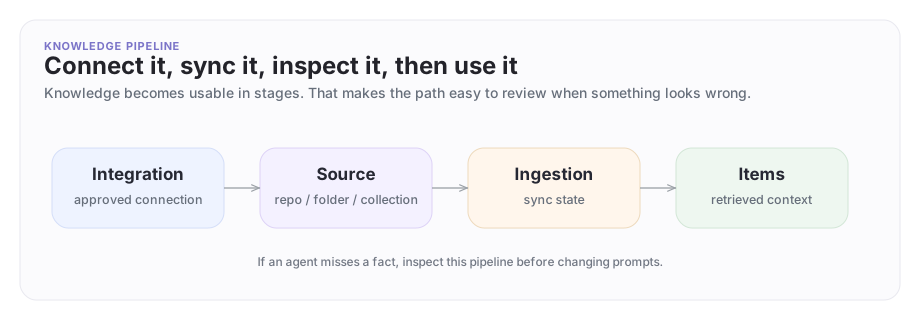
It helps to think of knowledge as a pipeline, not a blob:
- an integration connects to a provider
- a source defines what knowledge feed to use
- an ingestion syncs that feed
- items are the normalized records the agent can actually draw from
You can check each step: what is connected, what was synced, and what the agent can actually reach.
The knowledge pipeline
Knowledge becomes usable in stages: connect a system, define the source, sync it, then inspect the resulting items.
A concrete example
Imagine Company A runs the underlying deployment platform for Company B.
Company A wants its Platform Support Agent to help Company B diagnose a failing integration, but only with approved material:
- rollout runbooks
- known retry issues
- connector troubleshooting notes
- past validated migration steps
The right setup is not "give the agent every document." It is:
- connect the approved provider or document collection
- define the exact source that should be searchable
- sync it
- inspect what the platform actually ingested
- let the agent use only that approved body of knowledge
This keeps knowledge useful without turning it into "give the agent every document."
The main pieces
| Piece | What it means |
|---|---|
| Integration | The authenticated connection to a provider or workspace |
| Source | The specific feed, collection, or scope of knowledge to sync |
| Ingestion | The sync job that imports or refreshes knowledge |
| Item | One normalized knowledge record the platform can retrieve later |
| Credential | Secret material used for knowledge or browser access when needed |
Two distinctions matter:
- an integration says "we can connect to this system"
- a source says "this is the specific knowledge stream we want from that system"
This keeps the setup explainable to developers and security reviewers.
Set up from the CLI
Use the CLI or your coding agent to create knowledge connections:
- connect the outside system
- inspect scopes and ownership
- confirm which workspace, repository, inbox, or document collection should be used
For OAuth-based connections that require a browser redirect, the portal handles the initial authorization flow. Once connected, use the CLI to inspect and operate what was created.
Review the result in the portal for a visual overview of connected systems and their status.
Inspect integrations from the CLI
List the connected knowledge integrations:
archastro list integrations
archastro describe integration <integration_id>
This tells you:
- which provider is connected
- which workspace it points at
- who owns it
- whether the connection is still healthy
Use this when a developer asks, "Which knowledge connection is this agent actually using?"
Inspect and manage sources
Sources are what developers work with most.
They tell the platform which specific feed should become usable knowledge.
archastro list contextsources
archastro list contextsources --installation <installation_id>
archastro describe contextsource <source_id>
If you need to create or tune a source from the CLI:
archastro create contextsource \
  --type github_activity \
  --team-id <team_id> \
  --payload '{"repository":"company-a/platform-rollouts"}'
A source type is provider-specific. github_activity is one concrete GitHub-backed source type. Teams create the first source from the CLI or an agent template, then use describe contextsource and list contextsources to inspect the exact shape before scripting more of them. The portal provides a visual overview of all sources and their status.
A source is where the knowledge boundary becomes concrete. It is not just "GitHub is connected." It is "this exact repository or feed is part of the approved context."
Check ingestion health
Ingestion is where many real knowledge problems show up.
If the agent is not seeing the knowledge you expected, check the ingestion state before assuming the model is wrong.
archastro list contextingestions
archastro list contextingestions --status failed
archastro list contextingestions --source <source_id>
archastro describe contextingestion <ingestion_id>
This is the debugging loop:
- inspect the source
- inspect recent ingestions
- confirm whether the sync succeeded
- only then debug the agent behavior itself
That sequence saves a lot of wasted prompt debugging.
Inspect the resulting items
Items are the normalized records the platform actually has available after ingestion.
archastro list contextitems --source <source_id>
archastro describe contextitem <item_id>
If an agent keeps missing a fact, this is where you verify whether that fact exists in the synced knowledge at all.
This is a better debugging step than guessing about prompts.
About credentials
Some knowledge flows need credentials in addition to an integration.
The CLI supports credential inspection and management:
archastro list contextcredentials
archastro describe contextcredential <credential_id>
These commands return credential metadata such as domain, owner, and last access time. They do not print raw secret values back to the terminal.
Credential fields are stored encrypted at rest. The CLI is designed as a review and maintenance surface — it shows metadata, not raw secret values.
For credentials that involve sensitive values, the portal provides a guided setup flow that keeps secrets out of shell history. The CLI is the primary surface for:
- creating and managing credentials programmatically
- inspection and auditing
- controlled follow-up updates
Knowledge in cross-company work
Knowledge becomes much more important in Agent Network scenarios.
The rule is simple:
- each company keeps its private knowledge private
- collaboration happens in the shared thread
- the shared thread does not imply shared private context
This is both a configuration responsibility and a platform boundary:
- only attach the sources an agent truly needs
- review those sources before the agent joins shared work
- do not assume a shared thread should widen an agent's retrieval scope
Company B can ask Company A's agent for help without automatically widening access to Company A's full internal corpus.
Use Agent Network when the knowledge boundary needs to hold across company lines.
Best practices
Good knowledge setups follow five rules:
- connect only the systems that help the agent do its actual job
- keep each source narrow and intentional
- inspect ingestion health before debugging model behavior
- review items and ownership when results look wrong
- avoid mixing company-private knowledge into shared collaboration spaces
When the knowledge path is clear and explainable, the whole setup is easier to trust and review.
Where to go next
- Read Agents for the full runtime model.
- Read Installations for the broader attachment lifecycle.
- Read Tools if the agent also needs to act, not just read.
- Read Agent Network for cross-company knowledge boundaries.
Need something clearer?
Tell us where this page still falls short.
If a step is confusing, a diagram is misleading, or a workflow needs a better example, send feedback directly and we will tighten it.