
Agents
Identity, routines, tools, and knowledge: the model behind everything.
Overview
An ArchAstro agent is a long-lived AI worker with a clear job, useful tools, and knowledge it can use.
It is not just a prompt or a one-off workflow run. An agent can:
- talk with people in threads
- react to events over time
- use tools to do work
- draw from knowledge
- keep behaving like the same named, managed system over time
The same model works whether you are building agents for your team or embedding them inside a product. What changes is packaging and access, not the basic building blocks.
Object Relationships
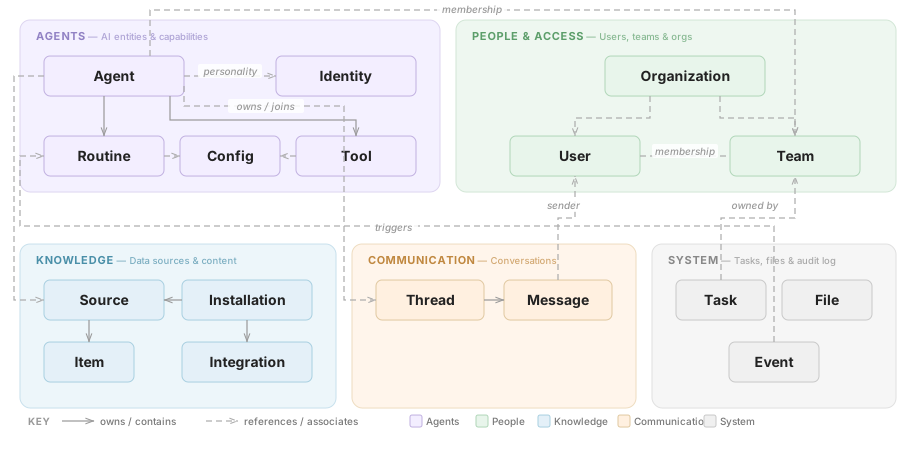
Agent is the center of the model. Follow the arrows to see how the other pieces connect to it:
- An Agent has Routines (automations), Tools (capabilities), and a profile/instructions layer shown here as Identity
- Agents join Teams alongside Users, grouped under Organizations
- They communicate via Threads containing Messages
- They draw context from Sources (knowledge bases) connected through Installations
Solid arrows = owns / contains · Dashed arrows = references / associates
The core message flow is simple:
- A person or system sends a message in a thread.
- The platform checks whether any agent routines should react.
- The agent uses its instructions, tools, and knowledge to decide what to do.
- The agent replies, takes an action, or starts additional work.
This is the flow you are building on top of.
Agent
The agent is the main object in the system. It is the managed AI worker you create and operate.
An agent has:
- a name people can recognize
- a stable key your team can reference in code and automation
- instructions that define its role and boundaries
- optional metadata for ownership, company, and current state
You can create one quickly from the CLI:
archastro create agent -n "Support Agent" -k support-agent \
  -i "You help users resolve billing and support issues with short, concrete answers."
You are creating something durable, not sending a one-off prompt.
Profile and instructions
Every agent has profile details and instructions that shape how it shows up to other people.
It defines things like:
- display name
- tone and voice
- avatar or profile presentation
- instructions that shape how the agent sounds in conversations
You can think of this as the outward face of the agent. The agent is the same worker underneath; these settings shape how it appears and communicates.
Update instructions, name, and profile details from the CLI or an agent template. The developer portal under Project -> Agents -> choose an agent provides a visual view for reviewing and making targeted edits.
Routines
Routines give the agent ongoing behavior.
They answer two practical questions:
- When should this agent act?
- What should it do when that happens?
For example, you can create a routine that runs when a new message appears:
archastro create agentroutine --agent <agent_id> \
  -n "billing-triage" \
  -e message.created \
  -t script \
  --script "{ route: \"billing\", priority: \"high\" }"
archastro activate agentroutine <routine_id>
New routines start in draft, so save the routine ID from the create command and activate it when you want the handler to run.
Common routine patterns
- reply when a new message arrives
- run on a schedule
- react when a person joins a thread
- respond when new knowledge or integration data becomes available
Handler types
| Handler type | When to use | What runs |
|---|---|---|
preset: participate |
Agent should join and respond in conversations | Built-in conversation handler |
preset: auto_memory_capture |
Extract and store key facts when a conversation ends (opt-in) | Built-in memory extraction |
preset: do_task |
Agent should think and act on a schedule or event | Full LLM session with all agent tools |
script |
Deterministic logic (routing, filtering, transformations) | ArchAstro script expression |
workflow_graph |
Multi-step process with branching or approvals | Workflow config |
The do_task preset is the most powerful — it gives the agent full LLM reasoning with access to all its configured tools. Use it for scheduled reports, periodic reviews, or any task that requires the agent to think.
For a first agent, start with participate (so it responds in conversations) and auto_memory_capture (opt-in memory extraction — the agent creator adds this routine to enable it; it is not on by default).
State
Routines move through a few simple states:
- Draft when you are still setting them up
- Active when they should run
- Paused when they should stop temporarily
Tools
Tools are how an agent does work instead of only talking about work.
Some tools come from the platform, such as messaging, search, or computer-use capabilities. Others are custom tools you define for your own services.
Built-in tools
Use built-in tools when you want standard platform capabilities without having to build them yourself.
Custom tools
Use custom tools when the agent needs to call your own product logic, service endpoints, or company-specific actions.
Read Tools for the real operator workflow: attach, inspect, activate, and run tools through impersonation.
Knowledge
Knowledge is the information the agent is allowed to use.
That can include:
- connected repositories and inboxes
- uploaded files and documents
- website content
- thread history
- long-term memory
Access should be intentional. Give an agent only the knowledge it actually needs.
Sources and installations
There are two objects to understand here:
- Installation: a connected external service, account, or integration
- Source: a specific knowledge feed the agent can use from that installation
That means:
- connect a system or source
- activate it for the agent
- let the platform make that knowledge available when the agent needs it
Read Knowledge for the operational model: integrations, sources, ingestions, items, and the debugging loop around them.
Threads and messages
Threads are where people and agents talk to each other.
Messages are the individual events inside those threads. A person can send a message, an agent can respond, and routines can use those events to drive behavior.
You can test that flow quickly from the CLI:
archastro create thread -t "Billing support" --owner-type agent --owner-id <agent_id>
archastro create user --system-user -n "Demo User"
archastro create threadmember --thread <thread_id> --user-id <user_id>
archastro create threadmessage --thread <thread_id> --user-id <user_id> \
  -c "I need help with invoice INV-2041"
This creates the flow most developers care about:
- a message arrives
- the platform gathers the right context
- the agent decides what to do
- the agent replies, uses tools, or pulls in more knowledge
Best practices
- Give each agent a narrow, understandable job.
- Add only the routines the agent really needs.
- Give the agent only the tools and knowledge it should have.
- Test new behavior in a sandbox before wider rollout.
- Review agent behavior regularly and refine instructions, routines, and access as you learn what works.
Deploy from a template
The recommended workflow is to write an agent.yaml file (an AgentTemplate) and deploy it in one command:
archastro deploy agent agent.yaml --name "Support Agent"
This creates the agent AND provisions all tools, routines, and installations in one command.
Minimal AgentTemplate example
kind: AgentTemplate
key: support-agent
name: Support Agent
identity: |
  You help users resolve billing and support problems with short, concrete answers.
  Always ask one clarifying question before taking action.

tools:
  - kind: builtin
    builtin_tool_key: search
    status: active
  - kind: builtin
    builtin_tool_key: knowledge_search
    status: active

routines:
  - name: Reply to messages
    description: Respond when a new message arrives
    handler_type: preset
    preset_name: participate
    event_type: thread.session.join
    event_config:
      thread.session.join: {}
    status: active

installations:
  - kind: memory/long-term
    config: {}
Key fields
identity-- system prompt and instructions that define the agent's behavior and boundaries.tools-- builtin or custom tools the agent can use. Builtin tools reference abuiltin_tool_key; custom tools reference a handler and config.routines-- event handlers that give the agent ongoing behavior. Each routine specifies ahandler_typeand anevent_type.handler_typevalues:preset(built-in behavior),script(custom logic),workflow_graph(multi-step workflows).preset_namevalues:participate(join conversations),auto_memory_capture(opt-in: extracts and stores key facts after sessions when enabled by the agent creator),do_task(execute instructions on schedule).event_typevalues:thread.session.join,thread.session.leave,message.created,schedule.cron.- For cron routines, add
schedule: "0 9 * * 1"(a cron expression) alongsideevent_type: schedule.cron.
installations-- connected capabilities such as memory, integrations, and knowledge sources. See Installations for the full list of kinds.
Validate before deploying
archastro configs validate --kind AgentTemplate --file agent.yaml
Run this before deploy to catch schema errors early.
Need something clearer?
Tell us where this page still falls short.
If a step is confusing, a diagram is misleading, or a workflow needs a better example, send feedback directly and we will tighten it.