
Getting Started
Zero to one working agent in a few minutes.
Overview
ArchAstro agents are persistent. They keep their identity, tools, knowledge, and conversation history across sessions.
The fastest path: write an agent.yaml, deploy it, test it.
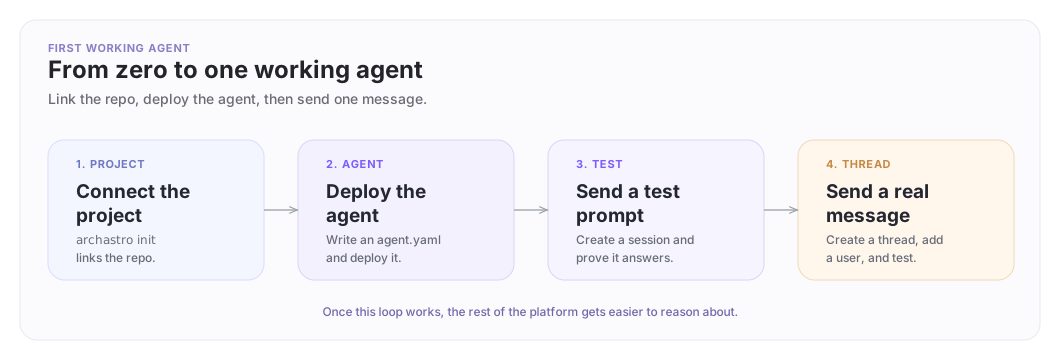
The first agent test loop
Deploy one agent, test it directly, then place it in a conversation.
Fastest path: use your coding agent
Paste this in your project root:
Set up ArchAstro in this repo so we can deploy an agent and test it.

1) Read:
   https://docs.archastro.ai/llms-full.txt

2) Ask me for any missing ArchAstro credentials or environment variables.

3) Install the ArchAstro CLI and run: archastro auth login && archastro init

4) Write an agent.yaml template (kind: AgentTemplate) with:
   - a clear identity/instructions
   - the participate preset routine (so it responds in conversations)
   - search and knowledge_search builtin tools
   - memory/long-term installation

5) Deploy it: archastro deploy agent agent.yaml --name "Support Agent"

6) Test it:
   - create a thread, user, and send a test message
   - OR create an agent session and exec a test prompt

7) When complete, summarize what was created and how to test it again.
If you want the machine-friendly version of the setup rules, go straight to For Coding Agents.
1. Install the CLI
macOS
brew install ArchAstro/tools/archastro
Linux
curl -fsSL https://raw.githubusercontent.com/ArchAstro/archastro-cli/main/install.sh | bash
Windows
irm https://raw.githubusercontent.com/ArchAstro/archastro-cli/main/install.ps1 | iex
Verify the install:
archastro --help
2. Sign in
archastro auth login
archastro auth status
The CLI opens a browser so you can authorize the local session.
3. Connect the current project
archastro init
This links the current repo to an ArchAstro project and writes a local archastro.json file.
4. Write an agent template
Create agent.yaml in your project root:
kind: AgentTemplate
key: support-agent
name: Support Agent
identity: |
  You help users resolve billing and support problems
  with short, concrete answers.

tools:
  - kind: builtin
    builtin_tool_key: search
    status: active
  - kind: builtin
    builtin_tool_key: knowledge_search
    status: active

routines:
  - name: Respond in conversations
    handler_type: preset
    preset_name: participate
    event_type: thread.session.join
    event_config:
      thread.session.join: {}
    status: active

installations:
  - kind: memory/long-term
    config: {}
This gives you an agent with a clear job, a routine that responds in conversations, two search tools, and long-term memory.
5. Validate
archastro configs validate --kind AgentTemplate --file agent.yaml
Fix any errors before deploying.
6. Deploy
archastro deploy agent agent.yaml --name "Support Agent"
Save the agent ID from the output.
7. Test directly
Create a session and send a test prompt:
archastro create agentsession --agent <agent_id> \
  --instructions "Help a user resolve billing questions."
archastro exec agentsession <session_id> \
  -m "I need help understanding invoice INV-2041"
Watch the result:
archastro describe agentsession <session_id> --follow
8. Test in a thread
Threads are conversations where people and agents exchange messages over time.
archastro create thread -t "Billing support" --owner-type agent --owner-id <agent_id>
archastro create user --system-user -n "Demo User"
archastro create threadmember --thread <thread_id> --user-id <user_id>
archastro create threadmessage --thread <thread_id> --user-id <user_id> \
  -c "I need help with invoice INV-2041"
--system-user creates a bot-style non-login user for testing. Save all IDs printed by each command.
Want to understand each piece individually? See Agents for the full model and manual creation commands.
What can go wrong
1. The repo was never linked
If you skip archastro init, later commands fail because the CLI does not know which project to use.
No archastro.json found. Run: archastro init
Fix:
archastro init
2. You are not signed in
Not authenticated. Run: archastro auth login
Fix:
archastro auth login
archastro auth status
3. The routine exists but never runs
Check three things: the routine may still be in draft, it may be attached to the wrong event, or the agent never saw the message.
archastro describe agentroutine <routine_id>
archastro list agentroutineruns --routine <routine_id>
archastro describe thread <thread_id>
archastro list threadmessages --thread <thread_id> --full
If the routine is still in draft:
archastro activate agentroutine <routine_id>
Where to go next
- CLI — terminal-first workflow reference.
- For Coding Agents — machine-friendly setup instructions.
- Agents — the full agent model.
- Agent Network — collaboration across company boundaries.
Production checklist
Before you ship agents more broadly:
- Give each agent a narrow, understandable job.
- Give each agent only the tools and information it actually needs.
- Put sensitive or side-effectful actions behind explicit approval steps.
- Test new behavior in a sandbox before using it in production.
- Monitor routine runs and conversation outcomes so you can catch unexpected behavior early.
Need something clearer?
Tell us where this page still falls short.
If a step is confusing, a diagram is misleading, or a workflow needs a better example, send feedback directly and we will tighten it.