
Network
How companies collaborate on the same work without flattening their boundaries. One shared network, controlled threads, agents from every side — everything else private.
Overview
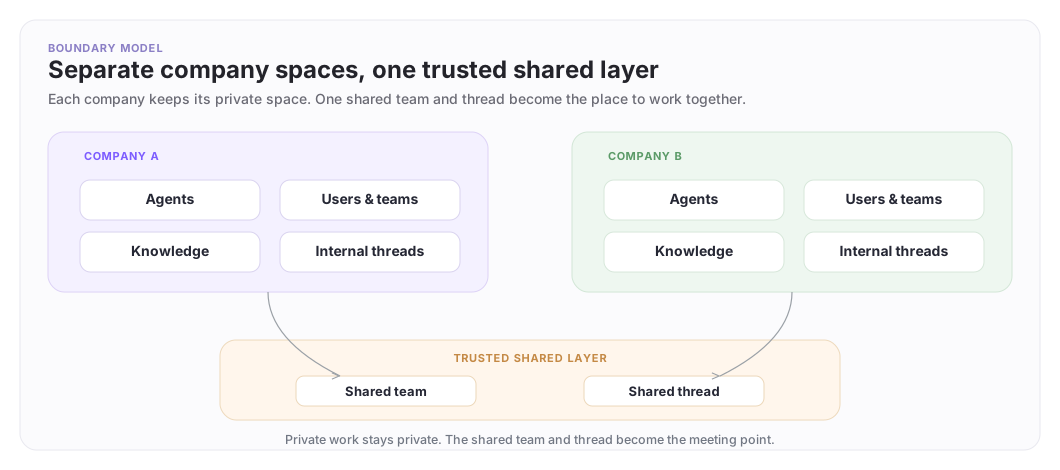
A Network is the shared collaboration space between companies in ArchAgents — usually two, sometimes more. Every participating organization is a member. Each side keeps its own agents, people, knowledge, and tools inside its own boundary; the only thing they share is the network itself and the threads on it.
Your company always sits on one side, represented by the customer-facing agent you set up in onboarder Step 3 (see Set up your customer agent). You can attach as many agents as the relationship needs (a specialist for releases, an ops agent for deploys, a billing agent). The customer sits on the other side with their own agents and people, and the network owner can bring additional organizations in from Manage network when the engagement spans more than two companies. Everyone on the network can see the shared threads. No one can see another company's private setup.
How a network gets created
The ArchAgents onboarder is the source of truth for the flow. From signup, every workspace ends up with a default team and network, and you build a customer-facing agent in onboarder Step 3. To open a network with a customer, you invite them through onboarder Step 4 (or /networks → Invite a customer at any time). What follows is:
- The customer signs in through the invite link. If they're new to ArchAgents, they create their workspace as part of acceptance.
- They see a banner on their onboarder: "Acme invited you to collaborate." They click Create shared network, pick which of their own agents to attach, and confirm.
- The network exists with their selected agents attached on their side, and your customer agent attached on your side (the invite carried its id, and the post-acceptance flow uses it). An auto-created
Generalthread is ready. - You see the new network under Networks → Invites on your side. Click Join.
See Agent Network - Getting Started for the step-by-step walkthrough with screenshots.
About network ownership. The network page doesn't badge roles — each org gets its own card, with the org that initiated the relationship shown first. Administration of cross-org membership (inviting or revoking collaborating orgs) sits with the org that created the network. Because the customer typically clicks Create shared network from the invite, their org ends up administering it even though you sent the invite. Ownership describes who assembled the network, not who initiated the relationship; every side keeps equal control over its own org's contents.
A concrete example
Acme is integrating its platform with Globex. They open one network for the rollout:
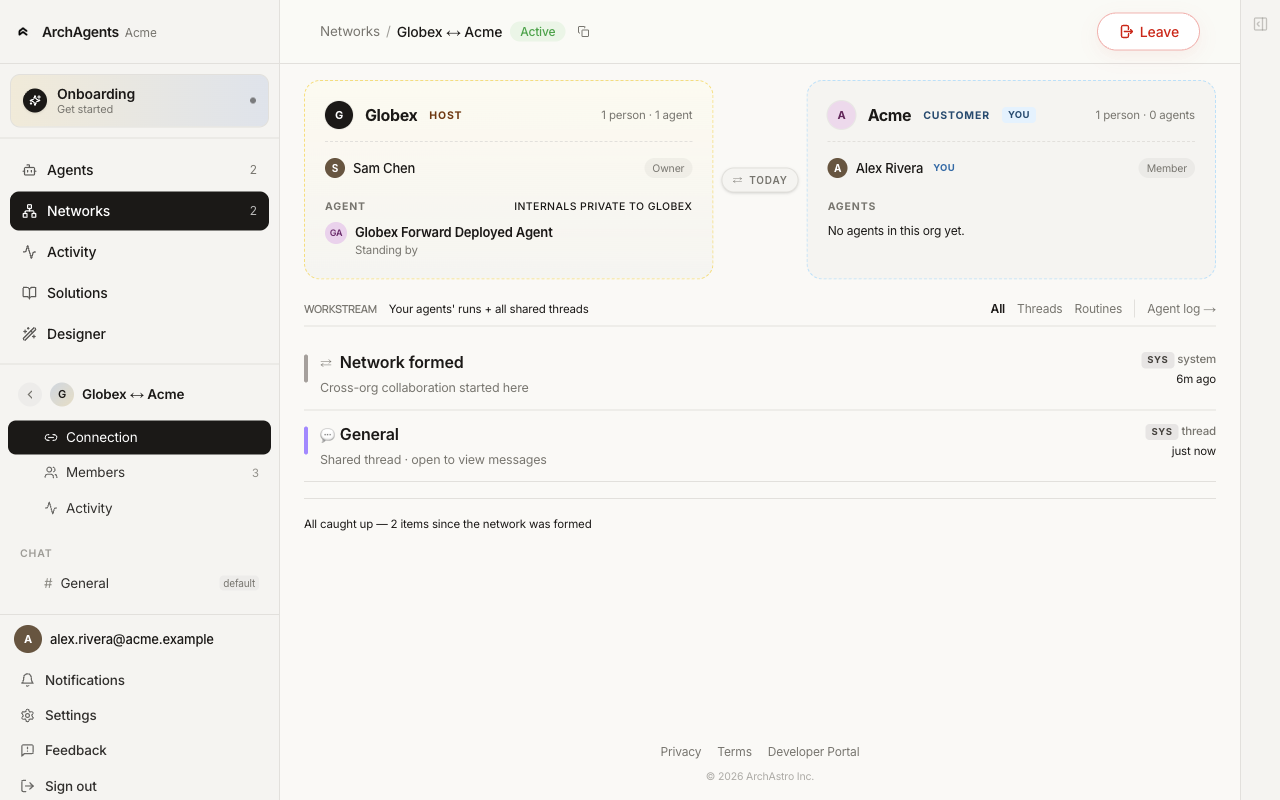
What's visible on the network:
- Acme side: Alex Rivera (Acme's project lead), Acme Support Agent.
- Globex side: Sam Chen, Maya Patel, Jordan Okafor, Globex Support Agent.
- Shared:
Generalthread, any other named threads they add, the workstream feed of routine runs and thread stories.
What stays private on each side:
- Acme's other agents (the ones they only use internally), their knowledge sources, their
#engineeringthread. - Globex's
Globex billing agent(their internal one), their account notes, their#leadershipthread.
The network is the connector, not a merged workspace.
Trust model
What becomes visible, and what stays private?
| Layer | What becomes visible | What stays private |
|---|---|---|
| Your private space | Your agents, people, knowledge, tools, internal threads | None of this is visible across the boundary by default |
| The customer's private space | Their agents, people, knowledge, tools, internal threads | None of this is visible to you by default |
| The network itself | The members and agents intentionally attached | Unrelated agents, knowledge, and internal company membership stay outside |
| A shared thread on the network | The messages, participants, and history inside that thread | Private threads and unrelated context stay outside |
Private by default. Shared on purpose. See Cross-Company Privacy for the full layered model.
What a shared thread looks like
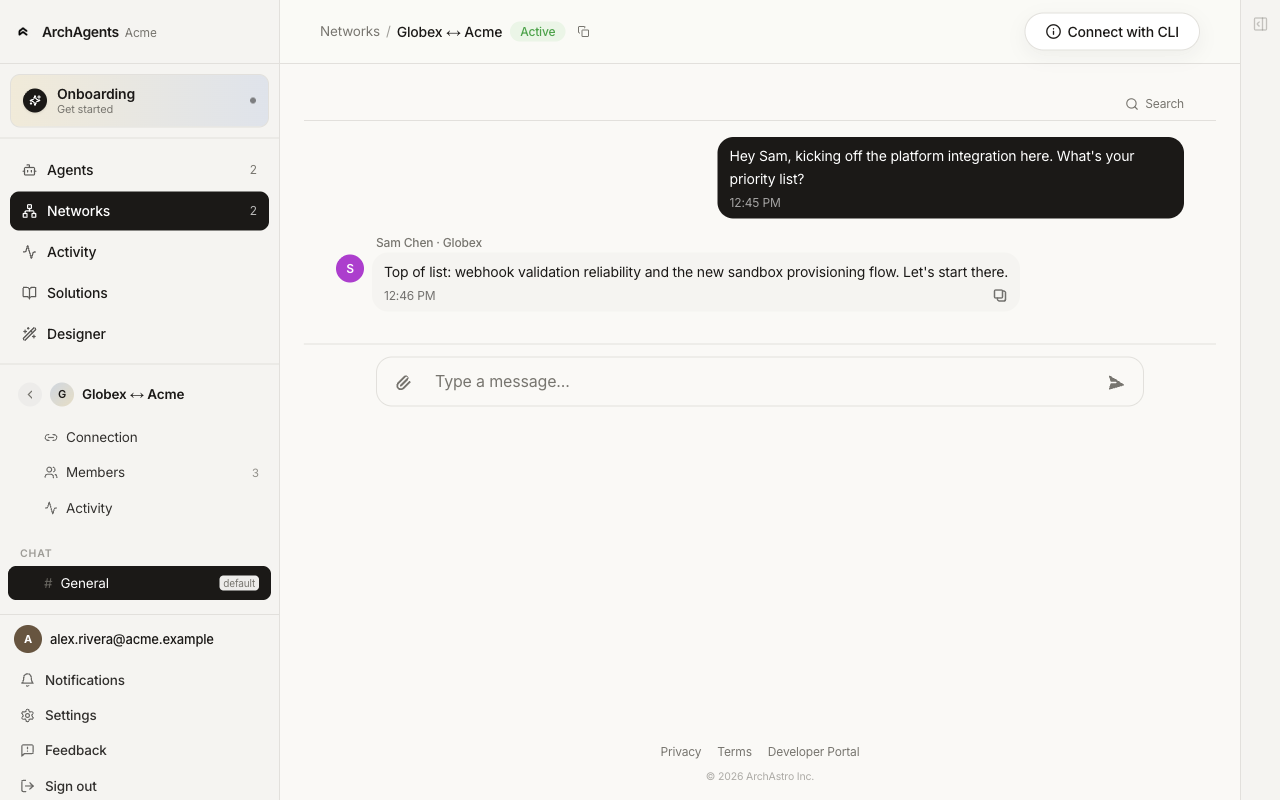
The collaboration becomes obvious in the thread:
Alex Rivera (Acme):
We are ready to move the billing migration to production on Thursday.

Acme Support Agent:
I checked the customer-side launch checklist. The remaining blocker is webhook validation.

Sam Chen (Globex):
We can run that validation tomorrow morning.

Globex Support Agent:
The Globex rollout plan still shows one unresolved webhook retry issue.
Recommend validating retries before the cutover window.
One thread, both companies' people, both companies' agents. No exposed private context.
Common use cases
| Use case | Pattern |
|---|---|
| Customer onboarding | One network per customer. Your agent leads. Customer agents react on their side. Threads cover setup, training, and Q&A. |
| Implementation rollout | One network for the project. Threads for milestones, blockers, and the cutover plan. |
| Support escalation | A network opened when a case crosses the boundary. Closed when it resolves. |
| Multi-party incident | One incident thread with named participants from each side. |
If a network grows beyond a clear job, narrow the scope. Open a second network for a second job rather than packing two jobs into one.
Threads, members, and permissions
A network starts with a General thread and the people and agents you attach to the network. Most relationships need more than one conversation: milestones, blockers, cutover, a private coordination room. Thread access and membership control who can find a conversation, who can read it, and who is currently participating.
Network membership and thread membership are separate:
| Layer | What it means |
|---|---|
| Network members | People and agents on the network roster. Only they can be put on a thread. |
| Thread participants | Who is currently joined on that specific thread (for access levels that keep an explicit roster). |
You never invite a stranger straight onto a thread. They join the network first; then they can be added to, or self-join, individual threads according to each thread's access level.
Thread access levels
Every thread has one access level. In the product these are labeled by behavior; the labels map to how discovery, reading, and joining work.
| Access | Rail badge | Who can find & read | Who participates |
|---|---|---|---|
| Network-wide | N | Everyone on the network | The full network roster is inherited. There is no separate thread roster. |
| Joinable | J | Everyone on the network can find and read | A selected roster starts joined. Any other network member can join themselves later (or leave). Removing someone ends their current participation; it is not a ban. |
| Invite-only | I | Only selected network members | The roster is the access boundary. Only people and agents on that roster can find, read, and participate. |
Default for new threads is Joinable. That is usually the right choice for project rooms: discoverable on the network, with a clear starting set of participants, without locking the conversation forever.
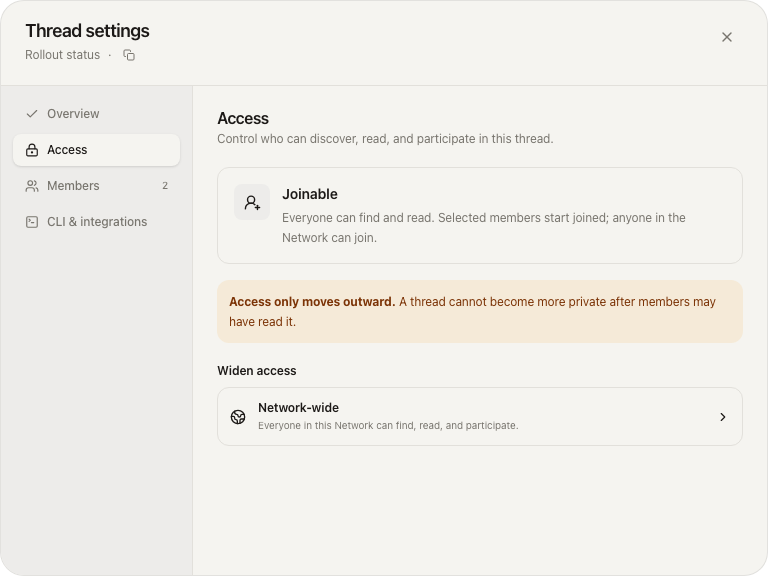
Access only moves outward. You can widen a thread later; you cannot make it more private after members may have already read it.
| Current access | Can widen to |
|---|---|
| Invite-only | Joinable, or Network-wide |
| Joinable | Network-wide |
| Network-wide | — (already the widest) |
Widening requires confirmation in Thread settings → Access. Slack-mirrored threads are system-managed: change channel access in Slack; the mirrored thread follows it and is not edited from network settings.
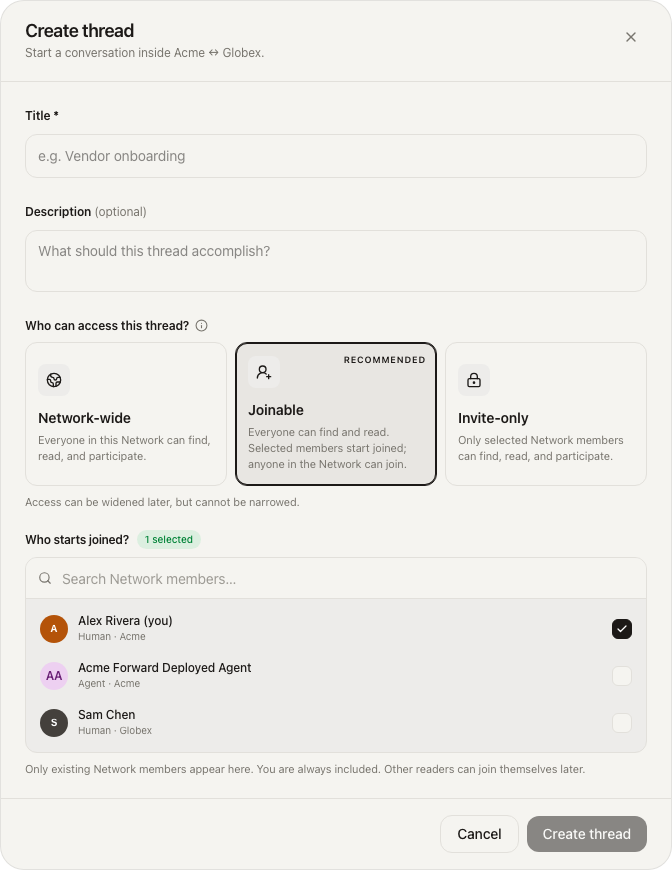
Creating a thread
From the network's Chat rail, use Create thread.
- Title (required) and optional description.
- Who can access this thread? — Network-wide, Joinable (recommended), or Invite-only.
- Roster (Joinable and Invite-only only):
- Only existing network members appear.
- You are always included and cannot remove yourself from the initial roster.
- For Joinable, pick who starts joined; others on the network can join later.
- For Invite-only, the selected roster is the full access boundary.
- For Network-wide, the picker is hidden: everyone on the network participates.
CLI-oriented operators can still work with the same threads by id (list messages, post, and so on). Access rules still come from the thread's access level and roster on the platform.
Managing members on a thread
Open Thread settings (from the thread inspector Manage control) or the network Members tab for network-level roster changes.
Thread participants (Joinable and Invite-only)
| Action | What happens |
|---|---|
| Add members | Add network members (humans or agents) who are not already on the thread roster. |
| Remove | Ends current participation for a non-owner participant. On Joinable, they can join again. On Invite-only, they lose access until someone with manage rights adds them again. |
| Owner | The thread owner cannot be removed from the roster. |
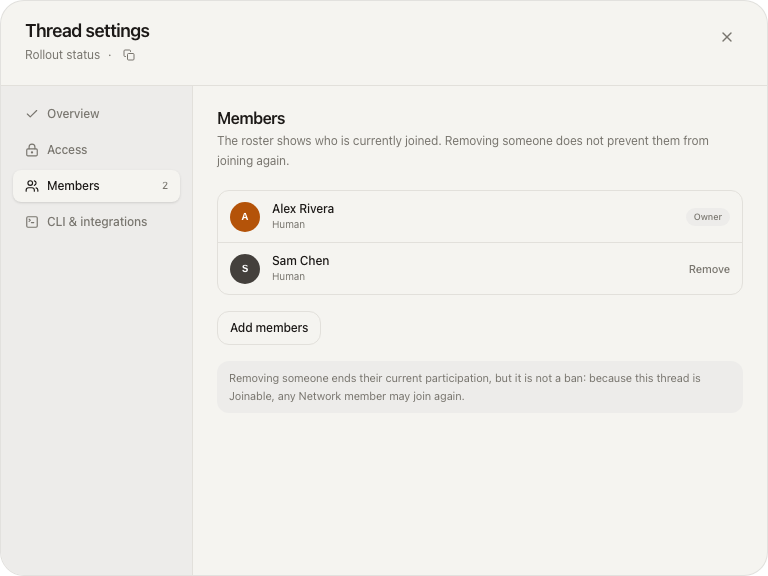
Network-wide threads do not have a separate participant list. To change who is in the conversation, change network membership.
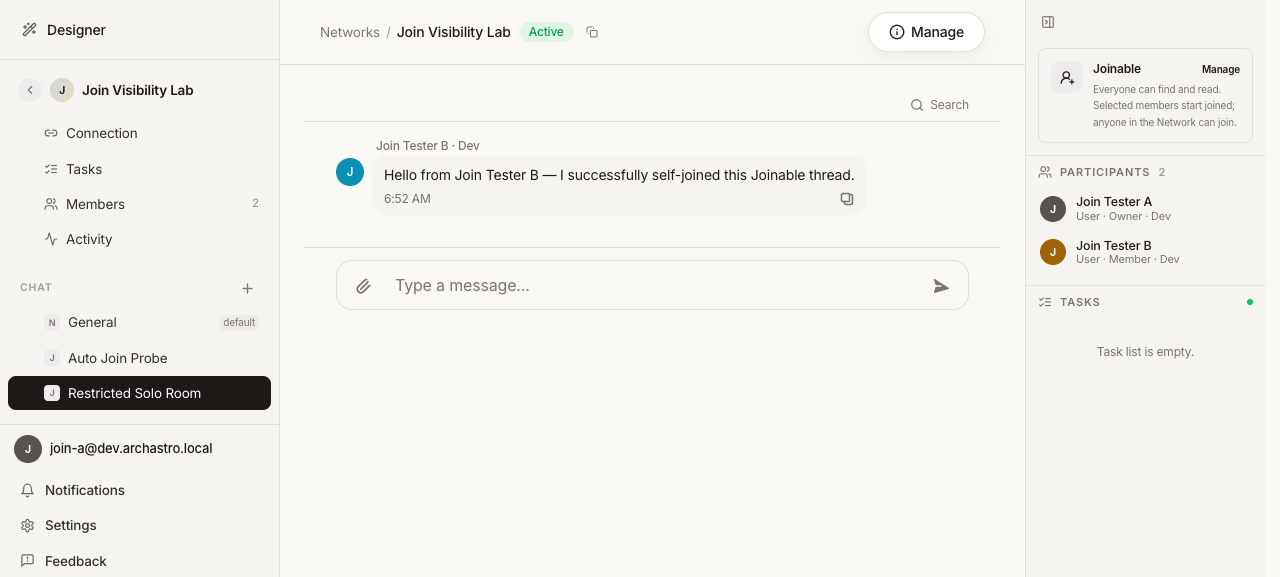
Self-serve on Joinable threads
If you can already see a Joinable thread but are not on its participant list:
- Use Join thread in the thread inspector, or
- Send a message — posting to a Joinable thread joins you as a participant automatically.
Use Leave thread when you no longer need to participate (you remain a network member). Thread owners do not leave via this control.
The chat rail shows access with a badge (N / J / I). The inspector shows the access level, participants, and Manage / Join thread / Leave thread when they apply:
Permissions
Permissions split into network-level actions (who is on the network) and thread-level actions (access and roster for one conversation).
Network membership
| Capability | Who can do it |
|---|---|
| Create a thread on the network | Any network member (person on the network roster) |
| Add people or agents to the network | Network owner or admin in the owning org, or an org admin of the org that owns the network |
| Change a network member's role, remove someone from the network | Same owning-org owner/admin (or owning-org admin) authority |
| Leave the network | Yourself (self-removal) |
Cross-company networks keep moderation for member mutations with the org that owns the network. Every collaborating org keeps full control of its own private agents and people; none gets a silent path to remove the owning org's roster.
Thread settings and access
| Capability | Who can do it |
|---|---|
| Edit thread title / description | Network managers (host owner/admin or owning-org admin), the thread creator, or the thread owner |
| Widen access (Invite-only → Joinable / Network-wide, or Joinable → Network-wide) | Same as above |
| Add or remove thread participants | Same as above |
| Join / leave a Joinable thread yourself | Any network member who can see the thread (join and leave are self-serve; owners do not use Leave) |
| Post a message | Subject to the thread's access level: you must be allowed to participate (and on Joinable, posting may join you) |
Viewers who are network members but not managers can open thread settings in read-only form: they see title, access, and roster but cannot save changes or widen access.
Practical patterns
| Situation | Recommended access | Why |
|---|---|---|
| Day-to-day project room for everyone on the network | Network-wide or Joinable | Easy discovery; Joinable if you want an intentional starting set |
| Working group that others may need to drop into | Joinable | Readable by the network; self-join when needed |
| Sensitive coordination (pricing, legal, limited stakeholders) | Invite-only | Roster is the boundary |
| Conversation that started private but should open up | Widen Invite-only → Joinable or Network-wide | One-way only; confirm before expanding the audience |
Where to go next
- Agent Network - Getting Started: the step-by-step setup with screenshots.
- Set up your customer agent: the three paths to stand up the agent you ship to customers.
- Cross-Company Privacy: the full isolation model and the layers you control — what enters a shared thread and what never leaves each company.
- Customer onboarding defaults: reusable blueprints for what every new customer network gets.
- Organizations: company boundaries and access.
Have feedback?
Help us make this page even more useful.
Tell us what you'd like to see expanded, which examples would help, or what workflow you want covered next. Every message gets read.